This Article contains the following:
Difference between CS141 Modbus and CS141 Professional
Modbus über RS485, RS232 und Modbus over IP
Field buses are bus systems that connect field devices like sensors or actuators to communicate with a parent automation device.
When multiple communication participants transmit their information over the same line, it must be clearly defined who (identifier) is allowed to transmit what (measured value, command) and when (timing or initiative). To ensure this communication works reliably, standardized protocols are used.
Since 1999, fieldbuses have been standardized worldwide in the IEC 61158 standard (Digital data communication for measurement and control - Fieldbus for use in industrial control systems). The second generation of fieldbus technology is based on real-time Ethernet.
Modbus-Protocol
Modbus is a protocol for serial communication. The data is transmitted using 16-bit registers (integer) or data byte status information.
Using Modbus has many advantages:
- The basic structure of Modbus has never really changed to ensure best compatibility over the years. The number of unified devices provides a stable platform for integration, maintenance and configuration.
-
This open protocol has been established as an unofficial standard in many industrial machines worldwide. Once a device is compatible with Modbus, it can typically be integrated into an existing Modbus network.
Modbus can be used as single-master protocol
The master controls the entire transmission and monitors any accidental timeouts. The connected slave devices may only send telegrams when requested by the master. For remote control and monitoring of equipment, the Modbus interface in each CS141 can read measurements, events, status information, and other data within the master-slave protocol.
Note:
If certain measured values appear to be missing, this is not necessarily an error. Especially when it comes to special functions, it may be that the UPS reports them to the CS141 via SNMP, but no Modbus address has been assigned to them by the manufacturer. In such cases, the CS141 will respond in the web interface to a function such as “Battery Low” and, according to the configuration, send messages, RCCMD commands, etc. However, this status cannot be queried via Modbus.
Difference between CS141 Modbus and CS141 Professional
Each device of the CS41 family is capable of handling Modbus over IP. The Modbus devices have an RS485 interface instead of the standard mini-DIN connector for sensors, specially designed for Modbus infrastructures.
Modbus Pin assignment
As a default, a Modbus plug is installed on delivery. The plug can be removed and later simply assembled to ensure a fast and intuitive wiring procedure.
Please note the plug alignment:
When removing the plug, pay attention to its orientation: The orange terminal strip must be positioned above the cable entry to ensure the following pin assignment is correct.
By doing so, the following PIN assignment can be used:
| PIN | Description |
| 1 | GND |
| 2 | RS485 A+ |
| 3 | RS485 B - |
To insert an appropriate cable, pull back the spring mechanism - the clamp will automatically lock the cable at the desired position.
The Modbus Terminator-PIN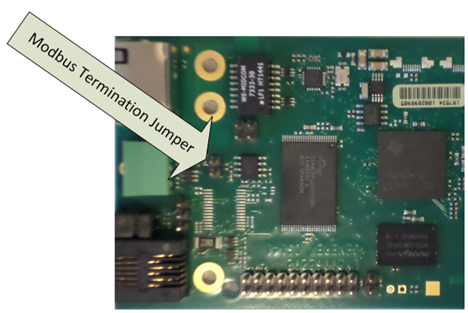
Another difference with the CS141 Professional: The CS141 Modbus adapter can drive a real RS485 Modbus protocol - not only Modbus over IP. In the case of operating within a real Modbus environment, you can easily integrate the CS141 Modbus adapter.
Since Modbus expects termination resistors on both the first and last devices in the bus network, the CS141 Modbus offers an optional 120-ohm resistor that can be enabled by setting a PIN.
As a default, this PIN is set to OFF - the CS141 is configured not to be the last device within the Modbus network. If required, this pin can be set manually. Activating this pin helps prevent signal bouncing on the line, which could otherwise cause communication errors.
Note:
In general, the CS141 MODBUS will query the UPS via SNMP and provide appropriate MODBUS addresses and values. Due to this fact, the UPS can be queried via MODBUS. Technically, the UPS is not connected to the Modbus network natively. However, the Modbus controller will not be able to recognize this fact.
Modbus über RS485, RS232 und Modbus over IP
As mentioned, all devices of the CS141 family can master MODBUS queries - the difference is in the details: While the CS141 Modbus version comes with an RS485 interface for native integration into a modbus infrastructure, the CS141 professional version uses a point-to-point connection via RS232 and provides the information via Modbus over IP:
Since Modbus via RS232 is usually used when you want to transfer Modbus data from the UPS to another system or special monitoring software, No terminating resistors are necessary for this connection type.
Due to this fact, the hardware layout of the boards changes if compared:
CS141 Modbus – Modbus over RS485 CS141 Professional – Modbus over RS232
If compared to each other, the CS141 Modbus can be easily distinguished from the CS141 Professional.
Since the external interface and the query via LAN can interfere with each other caused by differences in query timing, the parallel use of Modbus over IP and via internal interfaces is not possible - you need to choose between the query options. With these operating conditions Modbus over IP is available:
- The external Modbus interface has been explicitly deactivated on the CS141-SCM / LM - since this interface is an exclusive BUS interface, it is therefore a dedicated menu:
- The CS141 Professional uses a multifunctional Mini-DIN connector. Modbus over RS-232 is therefore just one of several connection options that can be selected:
Please note:
Depending on the scope of function, the CS141 will provide different menu entries. In addition to the device setup, the Modbus service must be enabled:
Modbus function codes
The CS141 supports the following function codes:
| 01H | Read Coils |
| 02H | Read Discrete Inputs |
| 03H | Read Holding Registers |
| 04H | Read Input Registers |
| 05H | Write Single Coil |
Please note that the actual function codes depend on the UPS connected to the CS141, because the UPS must support commands of this type. In general, the functions 03H and 04H are normally supported by standard UPS systems, whereby the CS141 makes no difference between these two functions. Since the CS141 supports polling speeds of up to 38400 baud, it can be flexibly integrated into an existing system.
Modbus error codes
Except for broadcast messages, where the master device sends a request to slave devices, a master always expects a unique and valid response from the according requested slave. If the reply does not meet the specifications, the packet is discarded with a corresponding error message.
The following possible events may occur when a master device requests data from its slaves:
The slave responds accordingly with a valid data packet.
The Master will react accordingly.
The slave device does not receive the request from the master.
This event occurs, for example, in the event of a communication error. Since the request was not answered from the master's point of view, the master reacts with a corresponding timeout.
Messages from the master or the slave are invalid
This phenomenon typically indicates that termination resistors have been forgotten or not properly set. Data is sent, but there are clearly errors in parity, LRC or CRC within the data packet. Since invalid packets are dropped by devices, the slave will usually reject to respond. The master generally responds to an invalid or faulty reply with a corresponding timeout message.
The request a slave receives is valid but cannot be answered.
If the slave unit receives a request without a communication error, but a readout is not possible—e.g., due to a non-existent register—the slave responds with a specific exception message to inform the master unit about the reason for the error.
Possible error codes coming with a CS141
- 02H llegal Data Address
The data address provided in the valid request cannot be processed due to an invalid or non-existent address.
- 03H Illegal Data Value
A value that was included in the request is not a permissible value for the slave.
- 06H Slave device busy
The slave has received a valid request but is currently busy with a time-intensive or time-critical process. Due to this, the CS141 is for the moment unable to process the request - the master will not declare a timeout but will repeat the request at a later time again.
v.: 2025-07-23 FW 2.16-2.26
Comments
0 comments
Please sign in to leave a comment.