The redundancy behavior depends on the settings of Connections and Heartbeats:
For the redundancy behavior to work properly, two preconditions must be met:
- Two valid IP addresses must be specified under Connections.
At least two IP addresses must be stored and allow inbound RCCMD commands.
Redundancy means, RCCMD should not shutdown the server until at least two transmitters have instructed to power down the host.
- The heartbeats must be set to "Automatic UPS alive check by polling"
RCCMD is instructed by the heartbeats to automatically check the availability of registered IP addresses:
Should a registered UPS become unreachable and the redundancy system shuts down, RCCMD will assume that there is a serious problem and shut down the system ignoring the redundancy setting.
Note:
Keep in mind that the intervals between lookups can be crucial for a shutdown.
Note:
The redundancy behavior refers exclusively to the RCCMD command shutdown
Other commands are handled individually and logged accordingly. With the ability to run your own scripts, RCCMD offers options to bypass the standard procedures in case of an emergency.
Defining redundancy levels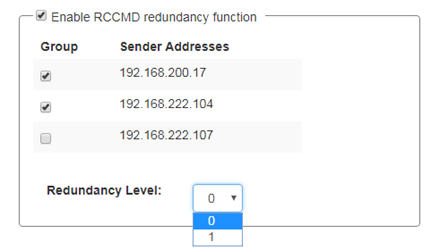
First activate the RCCMD redundancy function.
Then select the IP addresses that are allowed to send a shutdown signal.
The Redundancy Level is depending on the number of selected devices:
Number of selected units: 2
By using two devices, both need to send an RCCMD shutdown signal.
Since only two systems have been selected, only a maximum of one additional system can send this command. Thereby it is not important, which device is the first sender - this may change dynamically.
For 3 selected systems, the maximum value is 2:
If 1 unit + 2 other units instruct the shutdown, it will be executed. RCCMD does not differ which of the three systems sends the first shutdown.
Using 3 systems, you can also change the Redundancy Level to 1:
As a consequence, two out of three systems are needed for RCCMD to shut down the server. The combination may change dynamically. If you just want to pair 2 of 3 UPS systems, it is recommendable to select them and set the redundancy level to 1. By doing so, the shutdown will only be done if both selected UPSes will send a shutdown command.
Keep in mind:
With redundancy, you combine several devices. Under connections, you allow general incoming shut down signals. As a consequence, it is possible to configure one redundancy shutdown as well as several single shutdown senders.
Note
Please keep in mind that a shutdown instruction remains active until the system which has instructed the shutdown explicitly withdraws it. This is controlled via the RCCMD Custom Command wakeup.
Shutdown behavior with two UPS systems
In case of a shutdown signal, the redundancy will check whether the connectivity and availability of the second UPS system are intact. If it answers properly, the shutdown signal will be suppressed with reservation until further notice:
As soon as the second system instructs a shutdown, this command is executed and the system shuts down. If a shutdown signal is sent by the first system and the second system is not reachable, RCCMD shuts down the system - in this case, RCCMD assumes that the second system is not available.
Note: Remember to use Heartbeats!
While you globally define under Connections which CS141 is allowed to send valid signals, the heartbeats and redundancy together define when an automatic availability check is carried out in the event of a power failure. Without the heartbeats, the accessibility check only takes place in a rudimentary manner. Combined with redundancy, the heartbeats must therefore be switched on and configured.
Shutdown behavior with three valid devices
From three devices onwards, the redundancy behavior can be individually adjusted to necessary conditions:
- If one of three systems send a shutdown
- When two out of three systems send a shutdown
- All three systems must decide the shutdown together.
Each system can individually instruct and withdraw its shutdown via the RCCMD Custom command wakeup. In general, RCCMD will not execute the shutdown until the exact shutdown condition is met.
Redundancy-related scripting
If you use redundancy behavior, the RCCMD client waits to execute the shutdown until the appropriate number of devices also instruct the shutdown.
Because this process has a direct impact on the operation of the servers being monitored by RCCMD, a script will be launched to indicate an incident.
Use Edit File ... to customize and adapt this script to your individual requirements.
Abort will close the editor and withdraw all changes you made.
As a default, a text notification is pre-defined to indicate a redundancy-based shutdown behavior.
v.: 2025-08-26
Comments
0 comments
Please sign in to leave a comment.