This article contains the following:
Adding and removing individual virtual machines
Change shutdown order and move virtual machines
Shutdown Group 1 - The time-managed custom shutdown group
Shutdown Group 2: The General Shutdown Group
Shutdown Group 3: The Dynamic Group
Shutdown Group 4: The Host-based Shutdown Group
Detailed Real-time Shutdown Monitoring
With "VMware Shutdown Management", RCCMD offers options to shut down virtual machines in direct relation to one another. To use this function, respective hosts must be configured and verified in the "VMware settings":
While the VMware settings trigger a global shutdown, in which all virtual machines shut down simultaneously, VMware Shutdown Management defines a mutual dependency between individual virtual machines in advance, as well as a clear shutdown sequence and provides an overview of their respective operating states:
|
The virtual machine is currently powered off. All data is backed up. |
|
| The virtual machine is currently paused or in deep sleep mode. | |
| The virtual machine is running and will be affected by a power failure. | |
|
|
The virtual machine stored in a static group could not be found. RCCMD will skip to the next entry according to the settings. |
| Guest system: A virtual machine with this icon is a VM with any function. | |
| vCenter: A virtual machine with this icon is the vCenter for the respective cluster. | |
| The RCCMD appliance: This is the name assigned to the virtual machine. |
All currently deployed virtual machines are mapped to the ESXi host, including their respective operating states. This list is updated in real time during a shutdown, so it should be possible to add a virtual machine later.
Adding and removing individual virtual machines
Adding
To add a virtual machine to a shutdown group, drag and drop it into the desired shutdown group:
The virtual machine will no longer be displayed or managed by RCCMD in the host group, but by the custom shutdown group.
Please note that this setting is independent of ESXi host or vCenter settings. RCCMD will search for this virtual machine on all known hosts specified in VMware settings in the future to shut it down.
Removing
To remove a virtual machine from a static shutdown group, drag the virtual machine back to the corresponding host on the left side of the screen.
If you are unsure where the virtual machine is currently located, click the small trash can icon at "Remove." The corresponding entry will be removed from the list and added to the ESXi host where it is currently located.
Note: RCCMD cannot delete a virtual machine!
The RCCMD Shutdown Management allows you to automatically shut down virtual machines in a dependent manner. RCCMD will never delete a virtual machine from your server!
Change shutdown order and move virtual machines
RCCMD allows free movement of virtual machines within user-specific groups. Simply drag them to the location in the shutdown logic where they should be shut down.
• Within a shutdown group
• Between different shutdown groups
Shutdown Group 1 - The time-managed custom shutdown group
The trigger in the custom shutdown group, along with the duration (s) and delay (s), offers numerous options to customize a shutdown sequence:
Timing functions and trigger point provide custom time frame definition for dependency-based shutdown sequence. All virtual machines will then be shut down in an orderly manner based on this time-controlled schedule. When scheduling the times, please note that the values entered in this menu do not affect the shutdown time of the virtual machine itself. They are used exclusively by RCCMD's internal shutdown timing.
Trigger and time management functions for the custom shutdown group
The first virtual machine in the list offers two different time windows that affect shutdown management:
Starting with the second virtual machine in the list, there is also a trigger that defines when the respective counters should be started. This trigger restrictively links the shutdown to the shutdown of the previous virtual machine:
"after previous" defines that the individual delay only starts when the shutdown timer (Duration (s)) of the previous virtual machine has expired. In this example, the second virtual machine with a shutdown duration of 130 seconds will not start until the 90 seconds have elapsed + a 20-second time delay.
"with previous" defines that the delay of the subsequent virtual machine starts at the same time as the shutdown timer (duration (s)) of the previous machine: In this example, the second virtual machine will receive a shutdown signal 20 seconds after the first virtual machine and RCCMD will start the corresponding shutdown timer (duration).
As the number of virtual machines increases, the following shutdown logic results:
| Machine 1 will shut down after 10 seconds. |
| Machine 2 will wait 90 + 20 seconds and then shut down. |
| Machine 3 will initiate shutdown 10 seconds after Machine 2. |
| Machine 4 will initiate shutdown 10 seconds after Machine 3. |
| Machine 5 will initiate shutdown 80 + 10 seconds after Machine 4. |
If a virtual machine in the list no longer exists or is not found, RCCMD will meticulously adhere to the specified shutdown times and simply indicate that the virtual machine cannot be found. Therefore, if virtual machines are migrated to other data centers in advance, this will not affect the shutdown procedure.
When the duration (s) of the last machine has expired, the shutdown group moves to the next one: the general shutdown group
Shutdown Group 2: The General Shutdown Group
This group is intended for all virtual machines that can be shut down without special shutdown requirements. Global policies are applied:
- Shutdown Duration (s): 90 Seconds
- Delay (s): 0 Seconds
The list is processed directly from top to bottom, but allows you to define a rough shutdown order: Virtual machines that take longer to shut down than the estimated 90 seconds should be placed higher in the list than those that shut down more quickly.
After the shutdown duration (duration (s)) has expired, the shutdown proceeds to Group 3: The Dynamic Shutdown Group.
Shutdown Group 3: The Dynamic Group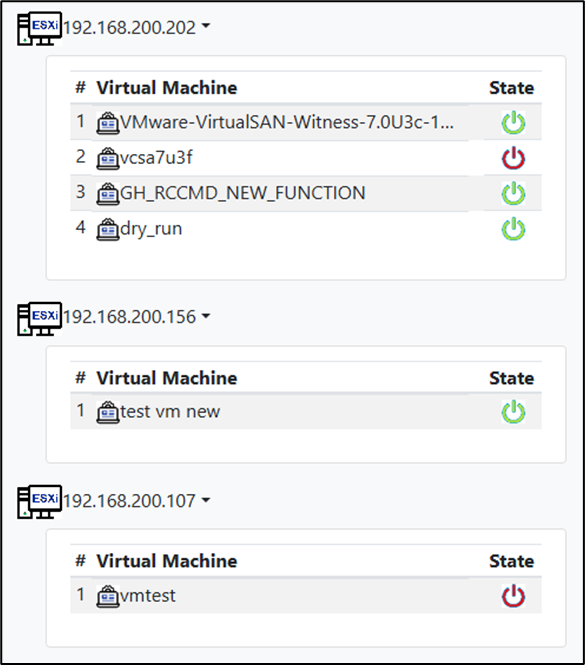
The dynamic shutdown group is a fully automated system group that captures all virtual machines that have not been explicitly assigned to another group:
When accessing VM Shutdown Management, all known ESXi hosts are queried in real time, and the available virtual machines are listed.
The special feature of this group lies in the details:
If a virtual machine is migrated or created on one of the known ESXi hosts after configuration, RCCMD will capture it in real time upon an actual shutdown signal and automatically assign it to this group.
Virtual machines that were previously migrated through vMotion or manual intervention are dynamically removed from this list.
This protects all virtual machines running on the hosts and shuts them down if necessary.
After 90 seconds, the process is forwarded to Shutdown Group 4.
Shutdown Group 4: The Host-based Shutdown Group
The host-based shutdown group includes all infrastructure-related servers
- DNS
- DHCP
- Gateway
- RADIUS
- VMware Appliance
- vCenter
- […]
Servers placed in this group are shut down via the VMware settings, and then the ESXi hosts.
Virtual machines that are not powered off at this point will be powered off cold when the hosts are shutting down.
Detailed Real-time Shutdown Monitoring
RCCMD offers a more passive monitoring mode that allows you to monitor the operating state of virtual machines in real time during a shutdown:
Once this feature is active, the virtual machine status query will be updated every xxx seconds until the checkbox is removed. This display will continue until the RCCMD appliance is ultimately shut down with the ESXi host and is no longer accessible.
Real-time Monitoring Options:
• Status of virtual machines
• Status of machines that are no longer found on the servers
• Status of newly added machines (migrated and redeployed)
• Status of the availability of an ESXi host
Note: Limited configuration options if active
Any changes to be saved will only take effect after the RCCMD appliance is restarted. The current shutdown routine is not changed in real time. If a real shutdown occurs while real-time monitoring is enabled, the currently saved configuration will be used to carry out the shutdown.
v.: 2025-08-26
Comments
0 comments
Please sign in to leave a comment.